Building a Personal AI Back Office
Judgment as the Product, Everything Else as Infrastructure
How I built an always-on AI agent system that handles execution, synthesis, and scheduling while keeping human judgment at the center of every decision.
Most people building personal AI systems make the same mistake: they give the agent full access to everything and hope for the best. The result is an autonomous system that occasionally deletes your emails, sends messages you didn't authorize, and operates with judgment you didn't audit.
I wanted something different. Not an AI that replaces my thinking, but one that handles the tedious infrastructure around it. The gathering, organizing, scheduling, and staging that consumes hours before real analytical work can begin. A back office, not a replacement.
I work across several domains. Analytics for a fintech SaaS. Strategic consulting through Ridgepoint Intelligence. Documentary and wildlife photography in northern New Mexico, where I'm currently building a long-term project on threats to Chaco Canyon's cultural landscape. And other personal projects that require their own research and coordination. Each of these generates context that needs to be captured, organized, and made useful without me spending my mornings reconstructing where I left off.
The system I built runs on a $300 mini PC in my house, communicates through Discord, and operates behind deliberate boundaries. Here's how it works, and more importantly, why the value is largely in what it won't do.
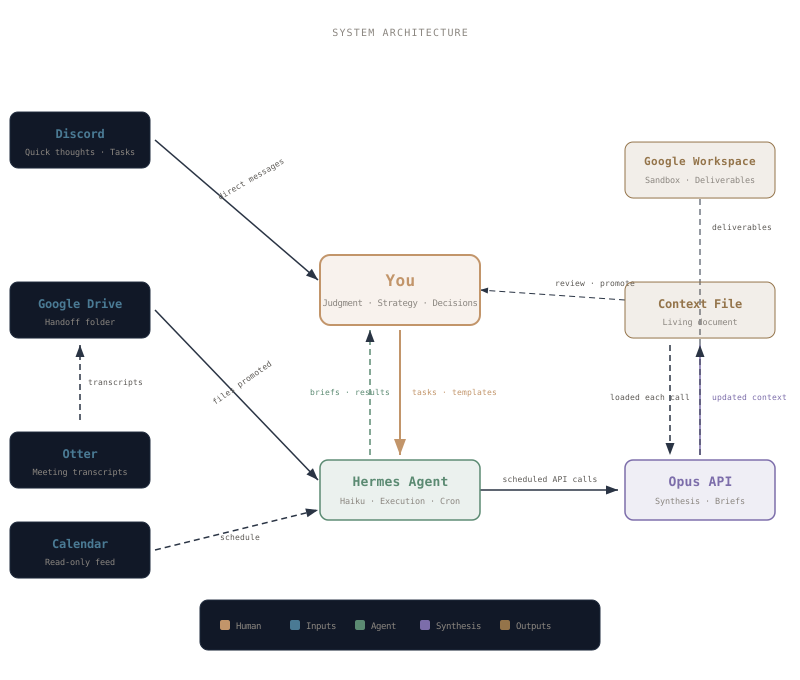
System Architecture
Guiding Principles
01 — Judgment stays human
The agent executes. You decide. Every piece of context crosses a deliberate boundary. Nothing is automated without your review. Pre-committed analytical frameworks, encoded as prompt templates, capture your judgment once. The agent applies them repeatedly.
02 — Air gap by design
The agent runs on a dedicated machine with no access to your work laptop, personal computer, or primary accounts. A sandboxed Google Workspace acts as the boundary. The agent can only see what you explicitly promote into its space.
03 — Tiered intelligence
A cheap, fast model (Haiku) handles execution: monitoring, scheduling, file management. An expensive, powerful model (Opus) handles synthesis: context integration, morning briefs, analytical work. You handle strategy. Each tier does what it's good at.
04 — Context accumulates organically
Rather than front-loading a massive prompt, the system builds depth over time. Daily notes flow in, get synthesized overnight, and the context file grows richer. Three months of nightly integration builds something no single-session prompt engineering can replicate.
Technical Stack
| Layer | Detail |
|---|---|
| Hardware | AMD Ryzen 4300U mini PC · Ubuntu Server 24.04 LTS · Headless, always-on |
| Agent | Hermes Agent · Docker-sandboxed execution · systemd service · Discord gateway |
| Models | Haiku 4.5 (execution) · Opus 4.6 via API (synthesis) · Stateless calls with injected context |
| Handoff | Google Drive (file boundary) · Google Workspace (sandbox) · Otter Pro (transcription) |
| Communication | Discord DMs · Cron-scheduled morning briefs · Ad hoc analytical requests |
| Security | No direct access to work/personal machines · Docker isolation · Restricted email · Manual promotion only |
The Daily Flow
Throughout the day, I work normally. Meetings, analysis, stakeholder conversations, field planning. Quick thoughts go to the agent through Discord. Meeting transcripts get captured on my phone through Otter and forwarded to the handoff folder. Consulting notes get promoted into Google Drive when I decide they're worth processing. Field notes from a day in the San Juan Basin go in the same way, alongside consulting deliverables and personal research.
Overnight, the agent wakes up on schedule. It gathers everything new from the Drive folder, packages it with a system prompt and the current context file, and sends it to Opus via API. Opus integrates the new material into the living context file, draws connections to existing threads, and produces a morning brief. The agent saves both to Drive and pings me on Discord.
I wake up, read the brief, and decide what needs deeper work. Anything that requires real exploration goes to a separate conversation where I work through it iteratively. Everything else stays in the context file, accumulating until it matters.
The key insight: I'm not asking the AI to think for me. I'm asking it to set the table so I can start thinking faster. The twenty minutes I used to spend every morning and between context shifts reconstructing where I am at and what's next now happens while I sleep.
What the Air Gap Actually Protects
The agent cannot send emails to my clients. It cannot push code to my repositories. It cannot access my work laptop, my personal file system, or my calendar beyond read-only visibility. It works in a sandboxed Google Workspace that contains only what I've explicitly shared.
This isn't a limitation. It's the entire design philosophy. Every horror story about AI agents deleting inboxes, sending unauthorized messages, or acting on stale instructions comes from the same root cause: too much access with too little oversight. The air gap makes those failure modes architecturally impossible.
The agent proposes. I dispose. Files stay in the sandbox until I actively promote them out. Nothing crosses the boundary without my hands on it. Whether I'm staging a consulting deliverable or organizing research photos from a week in the field, the same principle applies. The work stays contained until I choose to release it.
The Real Product
Someone working across multiple domains with an AI back office can operate at a capacity that used to require a small team, without the overhead of management, office space, or coordination. But only if the system is designed around a clear division of labor.
The agent handles logistics. The powerful model handles synthesis. You handle judgment. Each tier does what it's built for, at the cost tier it deserves. No $20/hour reasoning spent on $0.25/hour scheduling tasks. No autonomous agent making $250/hour decisions.
The best AI architecture isn't the one that does the most. It's the one that knows exactly where to stop.